Platform · B2B Dashboard · Design System
Plant Manager
The business-facing platform behind SmartPlant® and GardenSage™, where retailers and growers turn messy, inconsistent plant data into one standardized, connected source of truth.
Role
Product Design (UX/UI) · Design System
Scope
B2B Platform · Retailers & Growers
Team
The App Chefs: Engineering & AI
Year
2025–Present
The challenge
SmartPlant® and GardenSage™ only work as well as the plant data underneath them, and every retailer and grower who sells plants manages that data differently: their own spreadsheets, their own naming, their own level of detail. One store calls a plant “Orangeola Maple,” another has the full botanical name, and a third has neither, with no shared language between them, so the same plant gets re-described from scratch, inconsistently, over and over.
Plant Manager is the platform that fixes that, but it isn't built for consumers at all. I designed the business-facing tool that retailers and growers use to organize, standardize, and get value out of their plant data: the tool that makes everything a customer sees in the GardenSage™ app possible in the first place. I owned the Product Design (UX/UI) and design system in Figma; The App Chefs built it end to end using AI.
Research & Discovery
Before designing a shared taxonomy, I sat down with early retail and grower partners, Natorp's among them, to see how they actually tracked inventory: mismatched spreadsheets, a plant named differently at every store, and no shared reference for who owned a trademarked cultivar. That gap, not a hypothetical, is what made genus, species, and cultivar matching the foundation of the platform instead of an optional field.
Those same conversations surfaced a pattern I designed around directly: a retailer wants to know how their own plants are performing, and a grower wants to know regional demand across every retailer carrying their variety. Those are two different jobs, not one question asked two ways, which is why Plant Manager ships two distinct analytics views instead of one dashboard with a filter toggle.
Testing the import flow with a partner's real, messy spreadsheet, not a clean demo file, is what proved the auto-matching had to handle partial names and inconsistent formatting gracefully, since that's exactly what showed up the first time a retailer uploaded their actual inventory.
What I did
Designed around one common language for plants (genus, species, and cultivar), so every retailer's and breeder's data matches against a shared standard instead of each company's own naming.
Turned manual research into an import: a retailer brings in their whole plant list and Plant Manager auto-matches it against everything already known, pulling in rich existing data instead of starting from a blank spreadsheet.
Gave trademarked varieties one canonical, breeder-owned profile that every retailer selling that plant shares, so five stores carry one accurate record, not five slightly different versions of the truth.
Designed two distinct analytics views for two different questions: retailers see how their own plants are performing; breeders and growers see regional demand across the whole country through Plant Maps, because a store owner and a grower are never asking the same thing.
Connected the physical shelf to the app with barcode-to-plant scanning, so a customer scanning an in-store tag lands on that retailer's exact product, not a generic listing.
Extended the platform with an AI layer for growers: a plain-language market report per plant, reconciled from multiple AI sources rather than one, that regenerates on demand and remembers its last version.
How someone actually uses it
Import a plant list
A retailer or breeder brings in their inventory; no manual research required.
Automatic matching
Plant Manager matches each plant by genus, species, and cultivar against everything already known, enriching the list instantly.
Two ways to work with it
Retailers
Set up barcodes, manage their own catalog, see how their plants are performing with customers.
Breeders & growers
Own the canonical record for their varieties, see regional demand via Plant Maps, generate an AI market report per plant.
Synced straight to the app
Every update (a corrected name, a new barcode, richer data) flows into what customers see and how GardenSage™ answers them.
Key screens
01 · Frame the right problem
Good decisions were buried in inconsistent data.
Retailers and growers used different spreadsheets, names and levels of detail, leaving no shared source of truth.
Select a stage to inspect the thinking
Observed behavior
“Which plant record can I trust?”Insight Overview
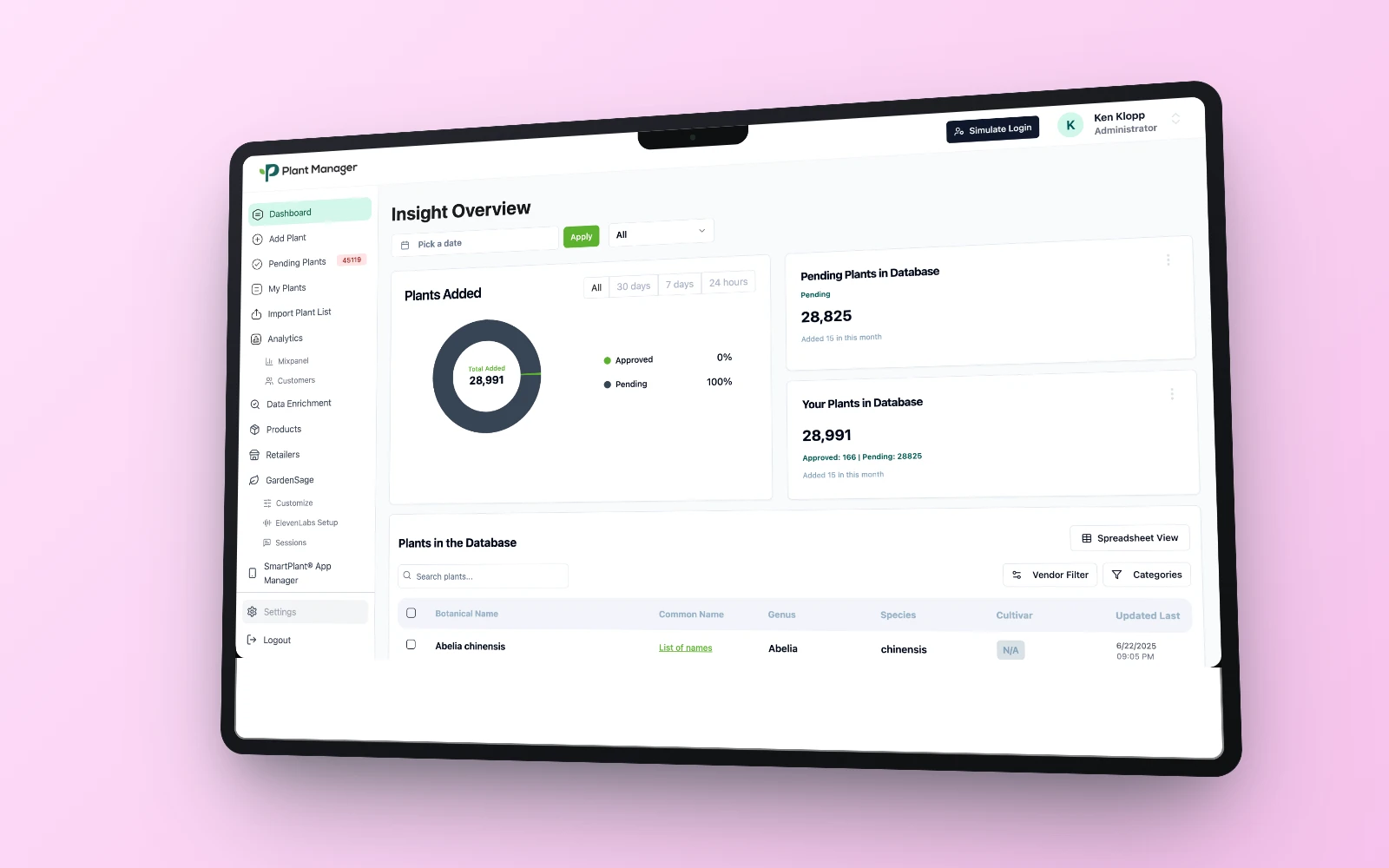
The whole database at a glance: plants added, pending vs. approved, and a searchable, filterable table below it, so an admin's first screen answers “what needs my attention” before anything else.
Retailer-specific engagement
Natorp's sees its own region, its own users, its own barcode scans and AI sessions; a retailer's view of the platform is scoped to what they actually sell, not the whole database.
One vendor's canonical library
Botanical Name, Genus, Species, and Cultivar as first-class columns: the shared plant taxonomy is designed to be scanned and filtered, not just stored.
One record, fully connected
Sync status to the SmartPlant® App, an AI-generated Garden Genius Analysis, and Primary Data ownership for trademarked cultivars: a single plant page ties data quality directly to what a shopper sees.
Real numbers, real users.
0
Retailers & growers on the platform
0M+
SKUs managed
0k+
Plant varieties covered